
DSA with JAVA
Grinding dsa with java
Basics of java
JAVA
The development environment of Java consists of three components mainly:
- JVM (Java Virtual Machine): JVM is the engine that runs Java programs. It converts Java bytecode (compiled code) into machine code (understandable by the OS).
- JRE (Java Runtime Environment): JRE = JVM + Libraries + Other components needed to run Java applications.
- JDK (Java Development Kit): JDK = JRE + Development Tools. It is required for developing Java applications.
Data Types in Java:
- Primitive: byte, short, int, long, float, double, char, boolean
- Non-Primitive: String, Arrays, Classes, Interfaces, Objects
 // -------- Primitive Data Types --------
        byte b = 100;              // 1 byte
        short s = 30000;           // 2 bytes
        int i = 100000;            // 4 bytes
        long l = 10000000000L;     // 8 bytes

        float f = 3.14f;           // 4 bytes
        double d = 3.14159265359;  // 8 bytes

        char c = 'A';              // 2 bytes (Unicode character)
        boolean flag = true;       // 1 bit

        // -------- Non-Primitive Data Types --------
        String str = "Hello, Java"; // String (class in Java)
        int[] arr = {1, 2, 3, 4, 5}; // Array
        Integer wrapperInt = Integer.valueOf(50); // Wrapper class example
        StringBuilder sb = new StringBuilder("Java"); // Class object
Variables in Java:
Java has 4 types of variables.
- Local Variables: Declared inside a method, constructor, or block. Accessible only within that block.
- Instance Variables: Declared inside a class but outside any method. Each object of the class has its own copy.
- Static Variables: Declared with the static keyword inside a class. Shared by all objects of the class.
- Final Variables: Declared with final keyword. Value cannot be changed once assigned.
Operators in Java:
They are basically of 7 types:
- Relational Operators:
==,!=,>,<,>=,<= - Arithmetic Operators:
+,-,*,/,% - Logical Operators:
&&,||,! - Assignment Operators:
=,+=,-=,*=,/=,%= - Unary Operators:
+,-,++,--,! - Ternary Operator:
condition ? value_if_true : value_if_false - Bitwise Operators:
&,|,^,~,<<,>>,>>>
Decision Making (Control Statements) in Java:
- if
- if-else
- if-else if-else
- switch
Loops in Java:
- for
- while
- do-while
- for-each
public class LoopsDemo {
    public static void main(String[] args) {

        // 1. For loop
        System.out.println("For Loop:");
        for (int i = 1; i <= 5; i++) {
            System.out.println("i = " + i);
        }

        // 2. While loop
        System.out.println("\nWhile Loop:");
        int j = 1;
        while (j <= 5) {
            System.out.println("j = " + j);
            j++;
        }

        // 3. Do-While loop
        System.out.println("\nDo-While Loop:");
        int k = 1;
        do {
            System.out.println("k = " + k);
            k++;
        } while (k <= 5);

        // 4. Enhanced For Loop (for-each loop)
        System.out.println("\nEnhanced For Loop:");
        int[] numbers = {10, 20, 30, 40, 50};
        for (int num : numbers) {
            System.out.println("num = " + num);
        }
    }
}
METHODS
Types of Methods in Java
- Predefined Method
Math.random()    // returns random value
Math.PI     // return pi value
- User-defined Method
sayHello         // user define method created above in the article
Greet()
setName()
Different Ways to Create Java Method
There are two ways to create a method in Java:
- Instance Method: Access the instance data using the object name. Declared inside a class.
- Static Method: Access the static data using class name. Declared inside class with static keyword
Method Signature
It consists of the method name and a parameter list.
- Number of parameters
- Type of the parameters
- Order of the parameters
max(int x, int y) Number of parameters is 2, Type of parameter is int.
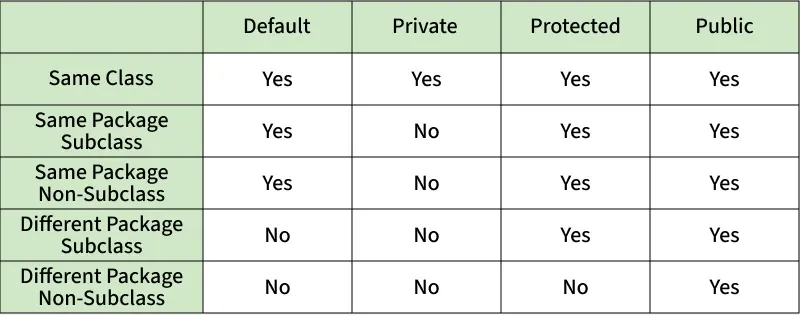
Access Modifiers in Java
-
Private Access Modifier: The methods or data members declared as private are accessible only within the class in which they are declared.
-
Default Access Modifier: When no access modifier is specified for a class, method, or data member, it is said to have the default access modifier by default. This means only classes within the same package can access it.
-
Protected Access Modifier: The protected access modifier is specified using the keyword protected. The methods or data members declared as protected are accessible within the same package or subclasses in different packages.
-
Public Access Modifier: The public access modifier is specified using the keyword public. Public members are accessible from everywhere in the program. There is no restriction on the scope of public data members.
Comparison Table of Access Modifiers in Java
Arrays
Arrays in Java
- In Java, an array is an important linear data structure that allows us to store multiple values of the same type.
Basics Operation on Arrays in Java
-
Declaring an Array
// Method 1: int arr[]; // Method 2: int[] arr; -
Initialization an Array in Java
int arr[] = new int[size];
Array Literal in Java
// Declaring array literal
int[] arr = new int[]{ 1,2,3,4,5,6,7,8,9,10 };
-
Change an Array Element
arr[0] = 90; -
Array Length
// Getting the length of the array int n = arr.length; -
Accessing and Updating All Array Elements
class Geeks {
    public static void main(String[] args)
    {
        // declares an Array of integers.
        int[] arr;

        // allocating memory for 5 integers.
        arr = new int[5];

        // initialize the elements of the array,
        // first to last(fifth) element
        arr[0] = 2;
        arr[1] = 4;
        arr[2] = 8;
        arr[3] = 12;
        arr[4] = 16;

        // accessing the elements of the specified array
        for (int i = 0; i < arr.length; i++)
            System.out.println("Element at index " + i + " : " + arr[i]);
    }
}
JVM throws ArrayIndexOutOfBoundsException to indicate that the array has been accessed with an illegal index. The index is either negative or greater than or equal to the size of an array.
Returing array
return new int[] { 1, 2, 3 };
Passing Arrays to Methods
public static void sum(int[] arr){}
Strings
Java Strings
In Java, a String is the type of object that can store a sequence of characters enclosed by double quotes and every character is stored in 16 bits, i.e., using UTF 16-bit encoding. A string acts the same as an array of characters. Java provides a robust and flexible API for handling strings, allowing for various operations such as concatenation, comparison and manipulation.
// creating Java string using a new keyword
        String str = new String("java");
Ways of Creating a Java String
There are two ways to create a string in Java:
-
String literal (Static Memory)
String str = "java"; -
Using new keyword (Heap Memory)
String s = new String("Welcome");
Interfaces and Classes in Strings in Java
CharSequence Interface
-
String
-
StringBuffer
StringBuffer demoString = new StringBuffer("python");
- StringBuilder
StringBuilder demoString = new StringBuilder();
demoString.append("hi");
- StringTokenizer
StringTokenizer class in Java is used to break a string into tokens.
StringTokenizer st = new StringTokenizer("Java String Example");
// Java String Example -> StringTokenizer -> {Java, String, Example}
Immutable String in Java. String is known as immutable. Because if we change string it does not change.
// Does not change
String s = "Sachin";
// concat() method appends the string at the end
s.concat(" Tendulkar");
// This will print Sachin because strings are immutable objects
System.out.println(s);
//output : Sachin

//Does change
String name = "Sachin";
name = name.concat(" Tendulkar");
System.out.println(name);
//output: Sachin Tendulkar
How Strings are Stored in Java Memory
String literal Using new Keyword
String methods
String s = "Java";

int len = s.length();          // 4
boolean isEmpty = s.isEmpty(); // false
boolean isBlank = s.isBlank(); // false (Java 11+)
char c = s.charAt(1); // 'a'
equals() vs ==
String a = "Java";
String b = new String("Java");

System.out.println(a == b);        // false (reference check)
System.out.println(a.equals(b));   // true  (content check)
Case-insensitive comparison
String x = "java";
String y = "JAVA";

System.out.println(x.equalsIgnoreCase(y));
System.out.println(s1.compareTo(s2)); // negative value
Searching in String
String s = "programming";

System.out.println(s.contains("gram"));  // true
System.out.println(s.indexOf('g'));       // 3
System.out.println(s.indexOf("ram"));     // 4
System.out.println(s.lastIndexOf('g'));   // 10
Substring Operations
String s = "HelloWorld";

String sub1 = s.substring(5);      // World
String sub2 = s.substring(0, 5);   // Hello
String Modification (Creates NEW String)
String s = "Java";

System.out.println(s.toUpperCase()); // JAVA
System.out.println(s.toLowerCase()); // java
System.out.println(s.concat(" Dev")); // Java Dev
Replace Operations
String s = "banana";

System.out.println(s.replace('a', 'o'));          // bonono
System.out.println(s.replace("na", "xy"));        // baxyxy
System.out.println(s.replaceAll("[aeiou]", "*")); // b*n*n*
replaceAll()uses regex
Trimming & Whitespace
String s = "   Hello Java   ";

System.out.println(s.trim());        // "Hello Java"
System.out.println(s.strip());       // Java 11+
System.out.println(s.stripLeading());
System.out.println(s.stripTrailing());
Splitting Strings
String s = "Java,Python,C++";

String[] langs = s.split(",");

for (String lang : langs) {
    System.out.println(lang);
}
Joining Strings
String result = String.join("-", "2025", "01", "06");
System.out.println(result); // 2025-01-06
Checking Start & End
String s = "programming";

System.out.println(s.startsWith("pro")); // true
System.out.println(s.endsWith("ing"));   // true
Converting Other Types to String
int x = 100;
double d = 10.5;

String s1 = String.valueOf(x);
String s2 = String.valueOf(d);
String to Primitive Conversion
int num = Integer.parseInt("123");
double val = Double.parseDouble("10.5");
Character Array Conversion
String s = "Java";

char[] arr = s.toCharArray();

for (char c : arr) {
    System.out.print(c + " ");
}
Formatting Strings
String name = "Kishore";
int age = 21;

String result = String.format("Name: %s, Age: %d", name, age);
System.out.println(result);
Interning (Advanced / Interview)
String s1 = new String("Java").intern();
String s2 = "Java";

System.out.println(s1 == s2); // true
StringBuilder & StringBuffer (Performance)
-
StringBuilder (Fast, NOT thread-safe)
StringBuilder sb = new StringBuilder("Hello"); sb.append(" Java"); sb.insert(5, " World"); sb.reverse(); System.out.println(sb); -
StringBuffer (Thread-safe, slower)
StringBuffer sb = new StringBuffer("Hello");
sb.append(" Java");
System.out.println(sb);
Reverse a String
String s = "Java";
String reversed = new StringBuilder(s).reverse().toString();
System.out.println(reversed);
appending in string
StringBuilder sb = new StringBuilder();
for (int i = 0; i < 1000; i++) {
    sb.append(i);
}
String result = sb.toString();
Things to know about strings
-
Immutability: “Strings are immutable.
concat()creates a new object, original string is unchanged.” -
String Pool vs Heap: “String literals go to String Pool,
newcreates a heap object.”String a = "Java"; String b = "Java"; String c = new String("Java"); System.out.println(a == b); // true System.out.println(a == c); // false -
==vsequals(): “==checks reference,equals()checks content.”String x = new String("Hello"); String y = new String("Hello"); System.out.println(x == y); // false System.out.println(x.equals(y)); // true -
String vs StringBuilder: “Use
StringBuilderwhen modifying strings repeatedly.” -
intern()moves string to String Pool.String s1 = new String("Java").intern(); String s2 = "Java"; System.out.println(s1 == s2); // true
DSA
DSA Map : https://whimsical.com/me91268/dsa-patterns-PB4rQDatXqchFby7D9RA93